
How data is displayed in Abusehq

·

Did you know you can localize how data is displayed in AbuseHQ?

AbuseHQ displays numbers, dates, and times, which all have different display formats in different regions. AbuseHQ Localization settings allow you to adjust them to your preference.
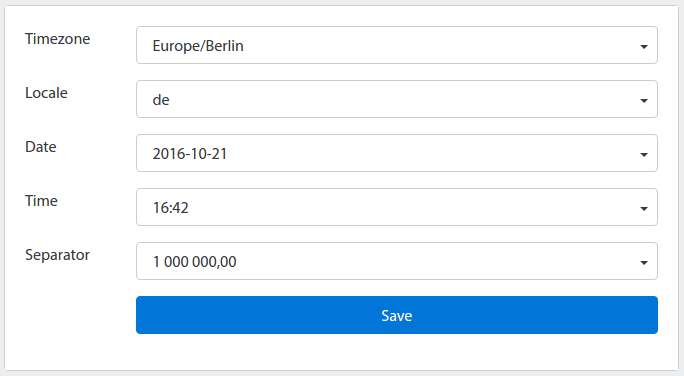
localization_settings2.png

Setting a Timezone will convert the timestamps that are stored in AbuseHQ (in UTC) to your local timezone for display. You can adjust date, time and number separator to appropriate formats that are based on your selected Locale.

In your AbuseHQ instance, go to /#settings/personal/localization to modify the settings for your account.

Read More

·

As we look to the future, network security and email protection are critical components of any organization’s cybersecurity strategy. In...

·

The internet is vast, and hosting providers’ role extends far beyond merely hosting websites and applications. With cyber threats becoming...

·

Threat intelligence sharing in network abuse management is crucial for all organizations. Cyber threats are evolving rapidly, and no single...